:::: MENU ::::

For those home automation lovers

  • The Smart Home Concept

  • Smart Home Features

  • Smart Climate

Saturday, October 30, 2021

When you’re thinking about home entertainment devices, one of the first things to consider is a Smart Hub, which connects all smart devices (lamps, light bulbs, smart locks, doorbells, etc.) within the home. Usually called “The Brain” is accessible through a centralized app that controls connected devices.

Instead of walking around the different smart devices like light switches, cameras, thermostat, etc., using a smart hub, you can schedule, command, and control everything from one central interface. In fact, the main benefit of a smart hub is so that you can control everything in a single app.

Thursday, October 28, 2021

Smart Display
A smart display is simply a virtual assistant-powered speaker with a screen designed to be used around the home. Specifically, these devices have touch screens that you can use for more than just controls—screens that support entertainment, informational videos, video chats, and much more. They can also connect to and control other smart devices in the house.

With a Smart Display, you can ask your smart display questions, and it’ll answer them, just as it will perform actions you ask it to with voice commands. They also have a much tighter focus on voice assistant commands and video-oriented capabilities. This feature makes smart displays very easy to use, even without training (you just talk to them), or if you don’t want to memorize a ton of voice commands, you can use the touchscreen that way as well.

Wednesday, October 20, 2021

A smart doorbell is a network (internet)-connected doorbell that notifies the smartphone/tablet or other electronic device of the home owner when a visitor arrives at the door. The video doorbell is also a theft deterrent sensor. 

It activates when the visitor presses the button of the doorbell, or alternatively, when the doorbell senses a visitor with its built-in motion sensors. This cool device allows you to see who is at your door from your smartphone. No matter where you are (inside alone or at work), you will know and being able to see and talk to whoever’s there, means you’ll never miss a package or an important visit.

Sunday, October 17, 2021

Smart motion sensors have a variety of security applications for detecting motion and alert homeowners when they are away. Motion sensors become an extra pair of eyes for you, they can alert you if there is movement within your home, or if your doors or windows have been opened or closed., alerting you to unwanted activity in your home. They can also be used to trigger home automations, like turning on/off the lights when someone walks into, or out of a room.

Motion sensors are also great for helping to save energy. These sensors can be connected to lighting or the thermostat to help control the energy usage in a room based on the occupancy of the room e.g. it will turn the lights out if no one is in the room or adjust to an energy efficient temperature when the room is unoccupied. For example, you could have a security camera on your back deck that has a motion sensor built in. If that camera detects motion anytime past 11 PM not only will the camera start recording but it will also turn on the back deck light!.

Saturday, October 9, 2021

When it comes to garages, smart garages bring unexpected improvements that feel instantly and definitely welcome. The WIFI connected smart garage door gives you some extra piece of mind.

The concept is simple, but can be powerful, never worry if you left the garage door open. You can open and shut your garage door from your phone/table and from any location.

Friday, October 8, 2021

In short, a contact sensor tells you whether something is open or closed.  These sensors let you know when people are entering and leaving your house and can even trigger some actions (turn lights on and off as doors are opened and closed).

Door and window sensors are your first line of defense for home theft; some sensors even detect when a window is broken by an intruder. Also, these sensors alert you to potential intruders. Once again, the wireless technology allows you to receive notifications straight to your phone or tablet and allows you to quickly call for help if needed.

Thursday, October 7, 2021

One of the most important and game-changing aspects of a truly Smart Home are the Smart Locks. You can (virtually) change the locks to your home anytime you like: no switching of cylinders, no trips to the hardware store, no new set of keys; instead, a few taps on the accompanying smartphone app.

With a smart lock, the door can be accessed by other means, which will depend on the lock. 

Some have keypads, and you can set up a code that will last only for a limited amount of time (or even single-use).

Some have wireless access, and you can share the authority to unlock a door with someone’s phone (and, again, time-limit it or revoke it whenever you want). 

They can be handy for locking and unlocking remotely  and can be set to send push notifications to your smart device whenever the door is unlocked; so that someone comes without their keys you can open it for them, or if someone tries to deliver something, you can open the door just to let them pop the package inside. 

Smart locks aren't just for doors though. You can also purchase padlocks with fingerprint and Bluetooth unlocking functions for an extra safe and reliable way to lock up bicycles, suitcases, lockers, and more.

The biggest and most obvious improvement smart technology brings to door locks is the ability to go keyless.

What type of lock do you need? It really depends on your door. Usually (though not always) a smart lock requires a pre-installed lock barrel, or at least additional hardware. That's perfect for the aesthetics of your home, enabling you to keep the hardware that matches your door and carry or perform an upgrade without much hassle.

There are two types of Smart Locks deadbolt (basically a sliding bolt that attaches the door to the jamb) and lever-style (they give you keyless entry for side doors or to lock interior doors). So, let's see the locks recommended here for the last quarter 2021.

1.- August Smart Lock Pro.

[CHECK IT]
  • Upgrade your existing deadbolt. August smart locks fit on the inside of your door, making your regular deadbolt smarter, more secure and way more convenient. Keep your keys just in case (but you won’t need them).
  • Grant access with the August App. Forget key copying. Quickly and easily share permanent, scheduled or temporary access to your home with friends, family and other people you trust, and never put a key under the doormat again.
  • Easy to install on any door. Even if you’re not so handy, installation only takes about 10 minutes. August locks fit perfectly over most single cylinder deadbolts.
  • Auto-Locks and Unlocks. Auto-Unlocks as you get home for totally hands-free unlocking. With Auto-Lock and DoorSense, your home automatically secures once your door is closed, or after a set amount of time (optional feature).
  • Works seamlessly with your smart home. Included Connect Wi-Fi hub allows your lock to work with your favorite voice assistant, including Amazon Alexa, Google Assistant, Apple HomeKit, Samsung SmartThings and more.
  • Renter-friendly. Renting or leasing your place? Home improvement isn’t just for homeowners. Modernize your apartment’s lock and then take it with you when you move - the old deadbolt thumbturn can be easily reinstalled. 
  • Keep your home’s curb appeal. Get smart lock functionality without changing the look of the outside of your front door. August smart locks are installed only on the inside of the door, so the design for your front door doesn’t have to adapt.
  • Add a keypad for use with codes. For phone-free moments, connect a Smart Keypad (sold separately) to unlock the door with unique codes. Great for small kids, the housekeeper, the dogwalker, or other one-time visitors
  • Rating: 4.4 of 10,357 Ratings in Amazon.

2.- Schlage CAM 625 Encode Deadbolt Smart Lock.

[CHECK IT]
  • Smart Lock with Built-in WiFi allows you to lock/unlock from anywhere - no additional accessories required. Pair with the Schlage Home app or Key by Amazon app to create and manage up to 100 access codes for trusted friends and family for recurring, temporary or permanent access.
  • Works with Alexa. Check the status of your lock and lock / unlock your door. In addition, Alexa will let you know when your battery is running low or set-up smart reorders through Amazon Dash Replenishment so you always have replacement batteries when needed.
  • Fingerprint-resistant, capacitive touchscreen with easy one-touch locking. Optional voice control offers hands-free convenience when using voice-enabled products.
  • Built-in alarm technology senses potential security breaches at the lock, while the low battery indicator offers advanced warning for battery replacement.
  • Easy to install with just a screwdriver. Unique Snap‘n Stay technology snaps the deadbolt onto the door so both hands are free during installation
  • Rating: 4.7 of 10,337 Ratings in Amazon.

3.- August Smart Lock, 3rd Generation.

[CHECK IT]
  • Secure, keyless entry via Bluetooth for your smart home. Lock and unlock your door, control, keyless access and keep track of who comes and goes, all from your phone. Works with your existing single-cylinder deadbolt.
  • Add an August Connect Wi-Fi Bridge (sold separately, separate bridge required for each lock) to remotely lock/unlock and monitor your door as well to integrate with Alexa, Google Assistant, Airbnb, Home Away, Simplisafe and others.
  • Keep your existing lock and keys. Easily attaches to your existing deadbolt, so everyone can still use their keys.
  • Send guest keys from anywhere instantly. All from the August app.
  • Control access for anyone. Grant access for a few weeks, a few hours, a few minutes. It’s up to you.
  • Be sure you are secure in Door Sense. Only August has Door Sense to tell you the door is completely closed and locked.
  • Locks automatically as you leave and unlocks when you arrive.
  • Simple, DIY installation. Install in about 10 minutes with just a screwdriver. 
  • Connect your August smart lock to Alexa to Lock, unlock and check lock status. Alexa can also provide notifications when your battery is running low so you can proactively replace them. Set up smart reorders through dash replenishment to make sure you always have replacement batteries when you need them.
  • Rating: 4.4 of 7,636 Ratings in Amazon.

4.- August (4th. Generation) Smart Lock.

[CHECK IT]
  • Upgrade your existing deadbolt. August smart locks fit on the inside of your door, making your regular deadbolt smarter, more secure and way more convenient. Keep your keys just in case (but you won’t need them).
  • Grant access with the August app. Forget key copying. Quickly and easily share permanent, scheduled or temporary access to your home with friends, family and other people you trust, and never put a key under the doormat again.
  • Easy to install on any door. Even if you’re not so handy, installation only takes about 10 minutes. August locks fit perfectly over most single cylinder deadbolts and aren't much bigger than your original thumbturn.
  • Auto-Locks and Unlocks. August Wi-Fi Smart Lock is able to Auto-Unlock as you get home for totally hands-free unlocking (optional). With Auto-Lock and DoorSense, your home automatically secures once your door is closed, or after a set amount of time.
  • Works seamlessly with your smart home. Built-in Wi-Fi allows your lock to work with your favorite voice assistant, including Amazon Alexa, Google Assistant, Apple HomeKit, Samsung SmartThings and more.
  • Renter-friendly. Renting or leasing your place? Home improvement isn’t just for homeowners. Modernize your apartment’s lock and then take it with you when you move -- the old deadbolt thumbturn can be easily reinstalled. 
  • Keep your home’s curb appeal. Get smart lock functionality without changing the look of the outside of your front door. August smart locks are installed only on the inside of the door, so your design for your front door doesn’t have to adapt.
  • Add a keypad for use with codes. For phone-free moments, connect a Smart Keypad (sold separately) to unlock the door with unique codes. Great for small kids, the housekeeper, the dogwalker, or other one-time visitors. 
  • Face or fingerprint ID for extra security. Use your phone’s biometric recognition for two-factor authentication (optional).
  • Rating: 4.3 of 5,041 Ratings in Amazon.

5.- ULTRALOQ Smart Lock U-Bolt Pro.

[CHECK IT]
  • Control Your Ultraloq Smart Lock Anytime, Anywhere. Unlock, share access and see a Log of who's entered and exactly when they did remotely using smartphone App with WiFi Bridge included. Share ekey or code remotely to your family, guests or service people for permanent access, specific dates or periods of time.Connectivity: 2.4GHz WiFi (802.11 b/g/n).
  • 6-in-1 Keyless Entry Smart Lock. Touch and Go 360° Fingerprint ID + Anti-peep Keypad + Smartphone + Auto Unlock + Shake to Open + Mechanical Key.
  • Auto Lock and Auto Unlock. Smart Lock automatically locks as you leave and unlocks when you arrive at your door with your smartphone in your pocket.
  • Smart Home Integration. Voice control with Alexa and Google Assistant. Works with IFTTT. Compatible with Apple Watch.
  • DIY Installation. Replace your current deadbolt with just a screwdriver. IP65 rated dust and weatherproof external Smart Lock built to withstand heat and cold. Backed by Ultraloq, world’s leading smart lock brand with more than 1 million happy American users. Plus lifetime mechanical warranty and 18 months electronic warranty.
  • Rating: 4.5 of 5,021 Ratings in Amazon.

6.- Wyze Lock Smart Door Lock.

[CHECK IT]
  • Wyze Smart Lock. Lock or unlock your door from anywhere using the Wyze app. Wyze Lock connects to your WiFi via the included Wyze Lock Gateway. Enable auto-lock and auto-unlock to never have to think about keys or codes again.
  • Certified for Humans. Smart home made easy for non-experts. Setup with Alexa is simple.
  • Simple Sharing. Wyze Lock lets you easily share access to your home with friends, family, contractors, dog walkers, and really, whoever you want. See a history of lock and unlock events. Wyze Lock gives you complete control of who has access to your home.
  • Door Position Detection. Wyze Lock not only tells you the lock status, but also if the door is open or closed. Unlike other locks, Wyze Lock has a built-in gyroscope to know the position of the door. No need for separate sensors.
  • Keyless Door Entry. Simply walk up to your door and have it unlock automatically and then lock behind you once you're inside. Purchase Wyze Lock Keypad and Wyze Cam separately for added security and surveillance. Works with your current key and deadbolt.
  • Rating: 4.6 of 4,411 Ratings in Amazon.

7.- Yale Assure Lock SL Smart Lock.

[CHECK IT]
  • Lose your Keys, for Good. Hands full, Have your door unlock for you with Auto-Unlock. Or unlock using the keypad, or Yale Access app on your smartphone or Apple Watch. Enjoy key-free access and leave the bulky keychain behind.
  • Expand your Smart Home: Connect your lock to your favorite voice assistant or smart home system. Works with Amazon Alexa, Hey Google, Airbnb, Philips Hue, Apple HomeKit, and more. Includes the Wi-Fi Connect Bridge so there’s no additional hub needed.
  • Auto-Locks and Unlocks. Your Assure Lock will Auto-Unlock as you get home for totally hands-free unlocking. With Auto-Lock and DoorSense, your home automatically secures once your door is closed, or after a set amount of time.
  • Stop sharing keys. Digital keys are the new hide-a-key. Quickly and easily share permanent, temporary or scheduled access with friends, family, and people you trust, and never hide a key under the doormat again.
  • Rating: 4.3 of 3,542 Ratings in Amazon.

8.- Yale Security Touchscreen Deadbolt.

[CHECK IT]
  • Unlock your door without keys by entering your code on the lock's backlit keypad; Lock the door behind you by pressing any button or by enabling auto relock.
  • Lock and unlock your door from anywhere by adding the lock to a compatible Z-Wave smart home or alarm system and app (i.e. Samsung SmartThings, Ring Alarm, Wink, etc.). Requires compatible hub sold separately and app - no Yale app is used for this lock.
  • Replaces your existing deadbolt in minutes on standard doors, 1-3/4" to 2-1/4" thick with just a screwdriver. No additional holes needed. Mounting hardware and batteries included.
  • Comes with two physical keys for added peace of mind.
  • Works with Alexa via a compatible hub. Features may vary based on Z-Wave controller. Requires compatible system for smart features.
  • Backed by Yale, the world's favorite lock brand since 1840 with a lifetime limited on finish and mechanical hardware.
  • Don't worry about getting locked out with dead batteries, the lock comes with 2 physical keys for back-up and will alert you when batteries are getting low.
  • Features a BHMA Grade 2 certified deadbolt that's fully motorized and super quiet.
  • Don't worry about marking your door, the lock has a rubber gasket to protect your door's finish.
  • Enable Auto Relock to ensure your door always locks behind you - Disable it at any time from the lock menu
  • Rating: 4.5 of 3,382 Ratings in Amazon.

9.- Kwikset Halo Smart Lock.

[CHECK IT]
  • Wi-Fi Enabled. Kwikset HALO smart lock is a WIFI connected door lock that connects directly to your home WIFI network and smartphone for a secure smart home that does not require a third party smart home hub panel or subscription.
  • 250 Customer User Codes. Create up to 250 unique user codes for friends family or guests that you can disable or delete from the Kwikset App Set schedules for custom user codes from your smartphone using the Kwikset app as well.
  • Receive Notifications. Receive notifications of your lock's activity and view the lock event history from your smartphone using the Kwikset app.
  • SmartKey Security. Protects against advanced break-in techniques and allows you to re-key your lock yourself in seconds. Alarm sounds after 3 consecutive incorrect codes are entered.
  • SecureScreen. Patented security feature for Kwikset touchscreen deadbolts that prevents on-screen fingerprint user code identification by employing random digits prior to entering a personal user code.
  • Voice Assistant. Works with Amazon Alexa and Google Assistant.
  • Kwikset products compatible with the Kwikset App only work in the United States and Canada
  • Rating: 4.2 of 3,182 Ratings in Amazon.

10.- SCHLAGE Sense Smart Deadbolt.

[CHECK IT]
  • Hands-free voice control requires Schlage Sense WiFi Adapter and Alexa device (sold individually).
  • Free iOS and Android smartphone app lets you manage codes, set schedules and view usage history.
  • Lock and Unlock from anywhere by pairing with the Schlage Sense WiFi Adapter (sold separately).
  • Pair with Apple HomeKit devices to use with iOS and Siri voice control only. 
  • Door thickness range - 1 3/8 to 1 3/4 inches thick door kit extends 1 7/8 to 2 1/4 inches.
  • Rating: 4.6 of 2,094 Ratings in Amazon.

11.- ULTRALOQ Smart Door Lock U-Bolt.

[CHECK IT]
  • Control Your Ultraloq Smart Lock Anytime, Anywhere. Unlock, share access and see a Log of who's entered and exactly when they did remotely using smartphone App with WiFi Bridge included. Share ekey or code remotely to your family, guests or service people for permanent access, specific dates or periods of time.Connectivity: 2.4GHz WiFi (802.11 b/g/n).
  • 5-in-1 Keyless Entry Smart Lock. Anti-peep Keypad + Smartphone + Auto Unlock + Shake to Open + Mechanical Key.
  • Auto Lock and Auto Unlock. Smart Lock automatically locks as you leave and unlocks when you arrive at your door with your smartphone in your pocket.
  • Smart Home Integration. Voice control with Alexa and Google Assistant. Works with IFTTT. Compatible with Apple Watch.
  • DIY Installation. Replace your current deadbolt with just a screwdriver. IP65 rated dust and weatherproof external Smart Lock built to withstand heat and cold. Backed by Ultraloq, world’s leading smart lock brand with more than 1 million happy American users. Plus lifetime mechanical warranty and 18 months electronic warranty.
  • Rating: 4.4 of 2,073 Ratings in Amazon.

12.- Lockly Secure Pro Smart Door Lock.

[CHECK IT]
  • Compatible with most standard doors 1.38 in. to 2 in. thick. Universal fitment with both right-swing and left-swing doors. Zinc alloy built lock with a rust and corrosion resistant satin finish backed.
  • Keyless Entry Door Lock. LOCKLY Smart Lock can recognize your fingerprint in just 0.5 seconds, and unlock your door in 1 second. It's faster than fumbling for your keys.
  • Exclusive, Hack-Proof PIN Genie Digital Keypad. Patented PIN Genie technology makes it nearly impossible to guess your personal access code (even if someone is watching) when entering your PIN number by always shuffling number locations on the secure, backlit keypad.
  • Remotely Lock/Unlock Anywhere with Free LOCKLY Phone App. See a Log of who's entered and exactly when they did remotely using smartphone App with WiFi Bridge included. Share ekey or code remotely to your family, guests or service people for permanent access, specific dates or periods of time.
  • Limited 5-year mechanical and finish warranty and 2-year electronics warranty & lifetime technical support.
  • Rating: 4.5 of 1,252 Ratings in Amazon.

13.- Kwikset (2nd. Gen.) Deadbolt Door Lock.

[CHECK IT]
  • Your smartphone is now your key touch to open convenience with the 2nd generation. If you wish to perform a system reset, press and hold the reset button on the back panel for 10 seconds until the lock beeps and the light ring flashes red.
  • Kevo 2nd gen now works with Alexa voice commands (requires Kevo Plus hub, sold separately for $99 via Kevo App).
  • Remote lock access & monitoring requires Kevo Plus hub, sold separately for $99 via Kevo App.
  • 3rd Gen Kevo App provides faster and more reliable connection. Smaller and sleeker metal interior with improved install experience. Now get free ekeys; Send and manage eKey access via smartphone receive notifications and monitor lock history.
  • Compatible with iPhone 4S or higher and select Android 5.0 or higher devices.
  • Works with Fob (sold separately) or traditional key with new advanced SmartKey security.
  • Works with select iOS and Android devices (wider compatibility with updated Google Play Kevo app which determines full and partial compatibility) please check compatibility (below) before purchase.
  • Smart Home compatibility with Amazon Alexa, Ring Doorbell, Skybell, Nest Learning Thermostat, select Honeywell Thermostats, Android Wear and IFTTT.
  • Note: 1. Make sure that you have the most up to date operating system on your phone. 2. Please check the cable connection between the interior and exterior deadbolt. 3. Please confirm that you have Bluetooth on and activated on your phone and that your phone is paired with your lock.
  • Compatible also with Razer Phone 1
  • Rating: 3.3 of 1,199 Ratings in Amazon.

14.- eufy Security Smart Lock.

[CHECK IT]
  • Your Finger is the Key. Smart Lock fingerprint door lock recognizes your fingerprint in just 0.3 seconds and unlocks your door in 1 second—it’s faster than fumbling for your keys.
  • Control From Anywhere. With its all-new Wi-Fi connectivity, you can control Smart Lock from absolutely anywhere via the eufy Security app.
  • Always Has Your Back. Even when you’re in a hurry, Smart Lock is ready to protect your home. A built-in sensor detects when your door is closed and locks it automatically behind you, every single time.
  • Multiple Ways to Unlock. Open Smart Lock using your fingerprint, with your phone via the eufy Security app, or by using the keypad or key.
  • Built to Last. With a sturdy zinc alloy and stainless steel frame, Smart Lock is tested to handle the comings and goings of a busy household for over 30 years. The IP65 rating ensures that come rain or shine, your front door is protected.
  • Compatible with Voice Assistants. Conveniently unlock Smart Lock from the comfort of your home via the Google Assistant or Alexa. (Note: the Google Assistant and Alexa are not built into the device).
  • All-Weather Protection. Smart Lock keyless entry door lock is ready to protect your home no matter where you live. With an IP65 weatherproof rating, it’s capable of withstanding prolonged rainfall as well as temperatures ranging from -30°C/-22°F to 70°C/158°F. 
  • Easy to Install. Install Smart deadbolt lock in just 15 minutes, all by yourself, using only a screwdriver—saving you money on calling a contractor.
  • 10,000mAh Battery for a Year of Convenience. The rechargeable 10,000mAh lithium battery allows you to enjoy convenient unlocking for up to 12 months. When a recharge is needed simply remove the battery or power up directly via the micro USB port. 
  • Emergency Unlocking. Use a portable charger to unlock your Smart Lock fingerprint lock in case it runs out of battery power. 
  • Rating: 4.6 of 808 Ratings in Amazon.

15.- Kwikset Halo Touch Traditional Arched Smart Lock.

[CHECK IT]
  • Keyless entry with just your fingerprint. Halo Touch smart door lock stores up to 100 fingerprints (50 users), so you can easily share access with your family and friends
  • WIFI Enabled. HALO Touch is a WIFI connected fingerprint door lock that connects directly to your home WIFI network and smartphone for a secure smart home that does not require a third party smart home hub, panel or subscription.
  • SmartKey Security. Protects against advanced break-in techniques and allows you to re-key your lock yourself in seconds.
  • Kwikset App Controlled. Manage your deadbolt lock from anywhere; Remotely lock and unlock your electronic deadbolt, manage users, set schedules, and check the status of your front door.
  • Receive Notifications. Monitor home security with notifications of your lock's activity and view the lock event history from your smartphone using the Kwikset app.
  • Kwikset products compatible with the Kwikset App only work in the United States and Canada.
  • Rating: 4.2 of 573 Ratings in Amazon.

Wednesday, October 6, 2021

Smart Security
Smart security is a modern day solution to age-old concerns of theft or vandalism, allowing you to check on your home and manage your set-up from your mobile devices, laptops or PCs. From a remote location, for example, a person can check the security of his home by checking the security cameras that are located throughout the home. This technology also allows homeowners to know if a window or door is ajar or open. This allows a homeowner not to leave the house open to vulnerability and risks and in that way be safer. It can send you a notification when your teenagers get home from a party or their part-time jobs. It can show you who's at your front door, and let you talk to them.

The top component for every smart home is the security system. A security system is there to protect you and raise the alarm in a big emergency like a fire or a break-in. But a smart security system doesn't stop there. Thanks to the evolution of technology, it makes itself useful every single day.

Smart Cameras
Smart Cameras offer the perfect way for you to monitor your property yourself without paying external security companies a monthly fee for the service. Many cameras include infrared or color night vision, cloud or local storage, and two-way audio, which allows us to speak to whoever is on camera. Some cameras also have smart platform integrations such as Amazon Alexa or Google Assistant. They usually connect to the internet using your home Wi-Fi or even wired. This means you can watch a live camera feed, receive alerts when you're out and about, and sometimes record footage.

Sunday, October 3, 2021

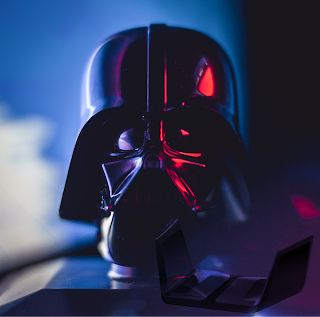
Darth Vader's Guide to WIFI Routers for Smart Homes
In today's world, this device has practically become an essential part of our lives, since in almost every place we arrive, there is a Wireless Network (WIFI) in whatever options available in the market.

In fact, if you are planning or taking the step to move your home to a smart one, this is one of the key factors in your smart home network to consider before you take the action of buying anything; first, because it’s normal that you have an existing WIFI Router and second, you should (as a recommended strategy to be successful) do a design (even if it is small) of your smart home network.

Once you have a good idea of what you want, then you should decide if a router upgrade is an option or if it's buying a new router, however, in both cases you need to pay attention to the following features.


WIFI Processor and RAM Memory.

In today's implantation, because of the multi-use of the WIFI Networks, the hardware inside the routers has become a key factor especially the processor and the quantity of RAM. People are using WIFI for Video Streaming, Video Conferencing, online gaming, File Downloads, Data Backups, etc., during which lots of data is transferred from and to the internet; and obviously, they need a lot more processing power than they used to.

Thus, at the moment to choose the new router, you must know whether it has a

WIFI Processor and RAM Memory
single-core, dual-core, or quad-core processor and its operating frequency.

If your requirements are to establish a fast network that can manage several network clients at the same time, you must forget buying routers with single-core processors and start thinking in a dual-core or quad-core solution. While the bigger the number of cores, the better the router performs, but increases the costs..

Thinking in the medium long term, the ideal is a router with a quad-core processor that can process millions of instructions per second, however you can perfectly start with a dual-core configuration.

Also, your router should not have less than 128MB of RAM. The ideal would be 256 MB of RAM or more. This is to make sure that it can process everything as fast as possible.


WIFI Bands.

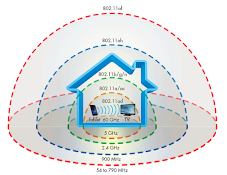
WIFI Bands In general terms, any router will offer at least two radio bands, a 2.4GHz band and a 5GHz band. The 2.4GHz band is used by a large number of devices (microwave ovens, bluetooth, phones, etc.) around your house and is more susceptible to interference and congestion while the 5GHz band provides a faster connection.

Most dual-band routers allow you to assign a band to specific applications and client, thereby balancing the load on both bands. But, If you have a network with

numerous clients  for bandwidth, you should consider a tri-band router. They use three (03) radios, one operates at 2.4GHz and the others two operate at 5GHz, for load balancing. For example, you could leave the 2.4GHz band for clients/applications that don't require lots of bandwidth and dedicate one of the 5GHz bands to handle tasks that require high bandwidth  like online gaming and reserve the other 5GHz band for video streaming.

Note: Recently was made available by the FCC the New 6GHz Spectrum.


Wireless Protocols.

The standards for Wireless Technology have changed quite a bit over the last decade. Wireless Ethernet networks use 802.11 protocols to send and receive data. The most widely used WIFI Protocol is 802.11ac, which allows for maximum data rates of up to 5,400Mbps and operates on both the 2.4GHz and the 5GHz bands.

The 802.11ac Protocol.

Wireless Protocols
The key aspect here is that 802.11a enables the Multiple Input Multiple Output (MIMO) technology, which uses several antennas to send and receive up to eight spatial streams, resulting in enhanced performance. It also supports beamforming, a technology that sends WIFI signals directly to a client rather than broadcasting in all directions, and automatic band-steering, which lets the router select the most efficient radio band based on network traffic, band availability, and range.

The 802.11ac Wave 2 protocol also enables Multi-User MIMO (MU-MIMO) technology, which is designed to provide bandwidth to multiple devices simultaneously. That means up to four clients can have their own data streams instead of waiting in turn to receive data from the router.

On AC Routers, when you see routers with labels like AC1200, AC3200, etc. This designates the maximum speed of the router. For example, a router that can achieve a maximum link rate of 300Mbps on the 2.4GHz band and 900Mbps on the 5GHz band is considered an AC1200 router. A tri-band AC3200 router gives you 600Mbps over the 2.4GHz band and 1,300Mbps over each of the two 5GHz bands.

See our Top 10 Smart Routers WIFI-5 recommendations for the last quarter of 2021.

The 802.11ax Protocol.

802.11ax, also known as WIFI 6,  is now hitting the market. WIFI 6 is an evolution of 802.11ac technology that promises increased throughput speeds (up to 9.6Gbps), less network congestion, greater client capacity, and better range performance courtesy of several new and improved wireless technologies including:

  • Orthogonal Frequency-Division Multiple Access (OFDMA). Increases network capacity and efficiency through smarter traffic scheduling by breaking WIFI channels into sub-channels, allowing up to 30 users to share a channel at the same time.

  • Target Wake Time (TWT). Is designed to reduce power consumption by allowing devices to determine when and how often they will wake up to begin sending and receiving data. TWT tech is expected to extend the battery life of mobile devices such as smartphones and tablets as well as battery-powered smart home devices such as security cameras and video doorbells.

  • Basic Service Set (BSS) Coloring Technology. Eliminates interference from nearby Wi-Fi networks, which is huge in dense neighborhoods with a sudden increase in teleworking users.

The 802.11ax protocol takes advantage of previously unused radio frequencies to provide faster 2.4GHz performance, and it uses refined uplink and downlink bandwidth management to provide enhanced QoS (Quality of Service). It also offers uplink and downlink MU-MIMO streaming (802.11ac only supports downlink MU-MIMO). As with the 802.11ac protocol, 802.11ax is backward compatible and will work with devices that use 802.11a/b/g/n/ac Wi-Fi radios.

In the following post you can check the Top 7 Smart Routers WIFI-6 for the last quarter of 2021.


WIFI Range.

WIFI Range A Wireless Network's range can vary wildly depending on the type of network. A standard home network using one wireless router can serve a single-family, but often not much more.

A general rule in home networking says that Wi-Fi routers operating on the 2.4 GHz band can reach up to 150 feet indoors and 300 feet outdoors, while 5 GHz Wi-Fi connection is more susceptible to obstructions than 2.4 GHz connections, and so will usually have a slightly shorter effective range, typically, 10 to 15 feet

shorter.

There are three (03) factors that influence your Wi-Fi range:

  • The Router. The WIFI signal range of any given router varies significantly from device to device. Factors that determine the range include the specific 802.11 protocol it runs, the strength of its device transmitter, and the nature of physical obstructions and radio interference in the surrounding area.

  • Type of Structure. Physical obstructions in homes, such as brick walls and metal frames, can reduce the range of a WIFI network by 25 percent or more. A WIFI signal weakens every time it encounters an obstruction, which happens a lot indoors, thanks to walls, floors, and even the electronic interference caused by some appliances.

  • Wireless Standard. The wireless standard that the router is using has a direct effect on your wireless signal range and strength.  The 802.11g protocol has an indoor range of 125 feet, while 802.11n has a range of 235 feet and the 802.11ac has an 115ft range indoors.

Many of the latest wireless routers can provide strong coverage to most rooms of a typical small-medium size house, but larger homes with certain characteristics (dense walls, multiple floors, metal, etc.) may require additional components to bring WIFI to areas that the router can't reach. The simple question is what to do?

In many homes it could help to add Range Extenders and Access Points.

  • Range Extenders. Do a good job of filling in dead zones, but typically provide only half the bandwidth that you get from your main router. They should be placed where a moderately strong WIFI signal already exists to ensure that they can lock onto WIFI and provide a stable extension.

  • Access Points. Offers more bandwidth than range extenders, but requires a wired connection to the main router.

The big concern for both solutions is that they typically create a new network SSID, and you have to log in while moving from one area of the house to another, as well as, the number of devices increases. Fortunately, you can expand the range using a mesh network.


Mesh Network.

A Mesh Network uses multiple router/repeater nodes to create a Wireless "Mesh" that can conform to your home's unique layout. There's a main router that connects directly to your modem, and a series of satellite modules, or nodes, that you place throughout your house.

The flexibility of a mesh network allows you to lay a blanket of WIFI over a house that spreads out horizontally. Or it can go vertical to cover each floor of a multi-level townhouse.

Mesh Network
It can even extend coverage to a garage or patio. Each node serves as a hop point for other nodes in the system. This helps the nodes farthest from the router to deliver a strong WIFI signal as they are talking to other nodes and not relying on one-to-one communications with the router.

They are all part of the same wireless network, and share the same SSID and password. Unlike range extenders, which communicate with the router via the 2.4GHz or 5GHz radio bands, most WIFI system satellites use mesh technology to talk to the router and to each other.

WIFI Mesh Networks are easy to expand and manage using your smartphone, allowing you to disable WIFI access to specific devices with the press of a button and give certain devices network priority without having to log in to a complicated network console. Depending on the number of nodes in the system you choose, you can spread a consistent internet connection across as much as 4,000 to 6,000 square feet of space.

See the Top 5 Smart Mesh Networks recommended for the last quarter of 2021.


Ports.

Ports

WAN Port(s).

Most of the routers today have (01) Gigabit port, which allow you to connect to wired ISP modem. Some modern routers come with configurable ports (WAN/LAN) and they represent an excellence option to be considered.

LAN Ports.

You should look for a router with at least four (04) 10/100/1000 (gigabit) Ethernet ports, which allow you to connect to wired devices such as desktop PCs, network-attached storage (NAS) drives, and home-automation hubs.

If you require faster throughput for large file transfers, look for a router that supports link aggregation. Simply put, link aggregation uses two gigabit Ethernet LAN ports to provide increased throughput (up to 2Gbps). It also provides a fail-safe if one LAN connection goes down and can be utilized to load balance your network traffic. Additionally, try to choose a router that offers removable antennas.

USB Ports.

Having at least one USB port makes it easy to plug in a printer or a USB drive and share it across the network, but with two ports you can do both. Routers with USB ports are now more commonly used for cheap networked storage. You can plug an HDD or flash storage drive into the back of your router and share that data with any device on the network. You can also use it to create a networked media hub for streaming movies, music or television shows you own locally.


Security.

It's human to be concerned about security, it’s a natural condition keeping the privacy of the information moving through the air. Advanced modern routers offer several layers of protection that you have to consider and keep in mind.

Parental Controls.

Parental controls allow you to limit network access for certain users to specific times and days and is ideal for parents who want to keep tabs on their child's
Security
online gaming and social networking activities. Some routers offer basic parental controls such as access scheduling and website blocking options, while others provide more robust controls that give you the ability to pause the internet and select age-appropriate presets that will automatically block access to social media platforms and sites that contain things like adult content, gambling, shopping, blogs, games, and more.

Guest Network.

A Guest Network lets you offer WIFI connectivity to guests without leaving your entire network vulnerable giving access to your core network. In a nutshell, you're creating a separate network for guests with a Service Set Identifier (SSID) and Password that are different from your core network credentials. This lets your guests connect to the Internet, but doesn't give them access to your files, printers, and other connected devices.

Virtual Private Network (VPN).

A secure virtual private network (VPN) connection can help keep confidential work communications safe, but it might be worth checking in with your IT department to coordinate security on the homefront.

WIFI Protected Setup (WPS).

A router with WIFI Protected Setup (WPS) lets you add compatible devices with the push of a button. Just press the WPS button on the router then press the WPS button on the client device to add it to your network

WIFI Protected Access (WPA, WPA2 or WPA3).

WIFI Protected Access (WPA) is the current protocol for securing wireless networks which requires entering a network password for each device. Routers with WPA-Enterprise security offer a higher level of security than WPA/WPA2, but require a Remote Authentication Dial-In User Service (RADIUS) server to authenticate each client. The WPA3 protocol is the evolution of WPA2 and it provides new features for personal and enterprise use such as 256-bit Galois/Counter Mode Protocol (GCMP-256), 384-bit Hashed Message Authentication Mode (HMAC) and 256-bit Broadcast/Multicast Integrity Protocol (BIP-GMAC-256).

Look for ultra-secure WPA2/WPA3 capability in a new router.

Denial-of-Service (DoS) Attack.

A denial-of-service (DoS) attack can slow or even terminate your network connection. Many routers offer additional protection from this type of malicious hack.

Firewall.

Most routers also offer customizable firewall protection, which helps keep out spyware, malware and viruses.

Antivirus.

But some go a step further and offer direct integrations with McAfee, Trend Micro. etc. These security services manage your whole home and provide additional peace of mind.


Quality of Service (QoS).

Quality of Service (QoS) With QoS settings, you can decide which applications and clients get network priority. For example, if one device is streaming video, and another device is downloading files or running a print job, you can give priority to the streaming device to avoid choppy, out-of-sync video. The Same goes for online gaming assigning a high QoS priority to a gaming console such as the Microsoft Xbox Series X or the Sony PlayStation 5 will help eliminate lag time and improve overall gameplay. It also means you can keep those new work applications
protected, like a phone using voice over IP (VoIP) or that webcam that's keeping you connected to your office staff meeting via video conferencing.

Before you begin developing QoS policies, it's important you perform a network assessment that will provide you valuable information as to the current state of the network and provide a baseline for the types and quantities of data flows being processed today. 

Once the assessment is complete and issues remediated, the next step is to identify what network traffic is considered important to you, and then categorizing  data flows into specific classes.


Conclusion.

In this guide, the main objective has been to provide the complete view from the technical point of view about the principal aspects and characteristics to be taken into consideration when you are evaluating between the different market options available.

According to a 2020 study from the portal Statista.com, an average household network in America handles 10 devices that can connect to the internet. Always keep in mind that the more products you add to your smart home, the bigger the problem (more bandwidth will be used) will become, so it’s a good idea to assess your home network’s capabilities and do a network design before purchasing your next round of smart home products.

Depending on your house characteristics and requirements, you could increase the bandwidth with a high-quality router and complement it with range extenders and/or access points. Still, WIFI can be finicky so, whenever possible, connect your home’s smart devices via a wired network.

Today, most of the routers present in the market are based on the 802.11ac wireless standard (WiFi 5) or better, have Dual band radio (2.4 & 5.0 GHz) or better and have a speed of 1200 MBps or better. But routers with WIFI 6, have tri-band and offer the ZigBee 802.15.4 protocol are getting more presence.

Additional Routers features like WIFI, additional built in Security Options, and integrations with Smart Assistants should be considered.

Finally, there are a lot of things to keep in mind and good planning/design is the right strategy to be successful moving to a smart home.

A call-to-action text Contact us